
FloWrestling now features native, interactive scouting reports directly on the website and mobile apps. These web-based reports replace PDF files that you may have seen last season.
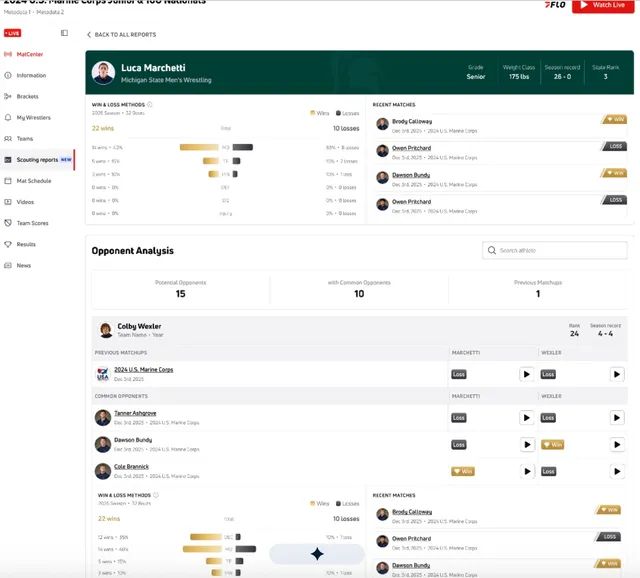
A scouting report provides a breakdown of an athlete heading into an upcoming event, highlighting their win/loss stats, recent match results, and providing an analysis of potential opponents in their weight class.
Scouting reports are generated 24 hours before an event and only when we have sufficient data on an athlete. Not every athlete will have a scouting report at the beginning of the season.
What is Included in a Scouting Report?
Each report covers a specific athlete at an upcoming event and is broken into two main parts:
1. Athlete Preview (Available to All Users)
- Athlete Header: Displays the event name, event date, athlete name, team, grade, weight class, season record, and state rank.
- Win & Loss Methods: Breakdown of wins and losses this season by method (decision, major decision, tech fall, pin, default, disqualification, and injury default).
- Recent Matches: Latest bout history with WIN/LOSS labels and clickable links to opponent profiles.
- Opponent Summary Counts: Highlights the total number of Potential Opponents, Common Opponents, and Previous Matchups.
2. Opponent Analysis (Paid Feature)
FloSports subscribers get full access to detailed opponent cards for every potential matchup in the athlete's weight class:
- Opponent Stats & Profile: Headshot, team, year, rank, and season record.
- Head-to-Head & Common Opponents: History of previous head-to-head bouts and results against shared opponents.
- Match Video Replays: Interactive play buttons on previous matchups and common opponent rows that open bout videos directly.
- Opponent Methods & Recent Matches: Full breakdown of each opponent's scoring methods and recent match history.
Where to Find Scouting Reports
You can view the same report from two locations:
- Event Hub: Go to the event page on FloWrestling and select Scouting reports from the left-hand menu (marked NEW). You can filter the report list by Team, Division, or Weight Class, or search directly by athlete name.
- Athlete Profile: Visit any athlete's profile page.
- The Home tab displays up to three recent report cards with a VIEW ALL link.
- The Scouting Reports tab lists all available past and present reports for that athlete.
Note: If you follow an athlete on FloWrestling, you will receive a notification as soon as a new report is generated for them.
Frequently Asked Questions (FAQ)
Why is there no scouting report for my athlete?
Reports automatically generate about 24 hours before an event, but only when FloWrestling has sufficient bout data and matched athlete records. Coverage is expanding over time. If an athlete or event has no reports, the Scouting Reports tab will not appear.
Can I download a PDF version or print the report?
No. Scouting reports are exclusively interactive web pages to support live match video replays and dynamic updates. PDF downloads are not provided.
I am a FloSports subscriber, but it still asks me to "Upgrade to Read the Full Report." What should I do?
Make sure you are logged into the account that holds your active subscription. Once logged in, the page will automatically update from the preview to the full report.
Why does an opponent card say "We don't have data on this athlete yet"?
This message appears when FloWrestling does not currently have historical bout data for that specific opponent in the system. Missing individual metrics (like rank or year) are hidden when data is unavailable.
Can I see reports from previous events?
Yes, past web-based reports remain accessible under the Scouting Reports tab on an athlete's profile. Note: Older legacy PDF reports from prior seasons are not available.